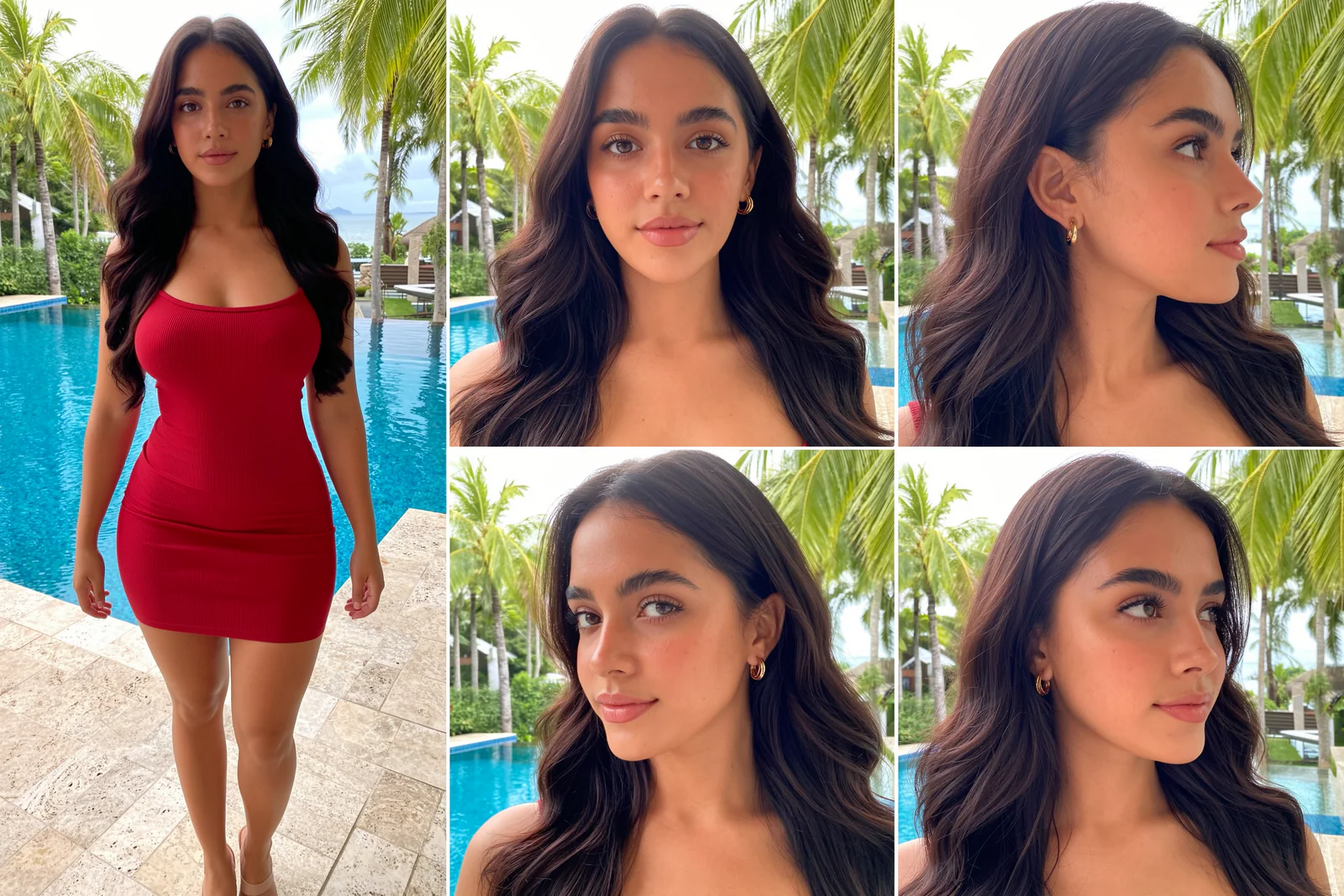
An AI character sheet (also called a character reference sheet) is one image that shows the same character from several angles: a full-figure shot, the front, the side and three-quarter views. It's what keeps an AI influencer looking like the same person in every photo and video you make next.
This free ComfyUI workflow makes a realistic AI character sheet with MOSS Image: one image with 5 photos of the same woman, the same face, outfit and place in every panel, in about 55 seconds on an RTX 5090. It also cuts the sheet into 5 separate photos with captions, ready for MiniMax H3, Seedance, Kling or a LoRA dataset.
Below you'll find the models, the settings, 4 example character sheets with the exact node fields I used, and the free workflow in the download section.
What you need
- An up-to-date ComfyUI that supports MOSS Image (see the official MOSS Image guide).
- The free MOSS FaceGen custom node from GitHub: ComfyUI-Moss-Character-Sheet. In ComfyUI Manager choose Install via Git URL and paste
https://github.com/Pixelailabs/ComfyUI-Moss-Character-Sheet, or rungit clone https://github.com/Pixelailabs/ComfyUI-Moss-Character-SheetinsideComfyUI/custom_nodes. Then restart ComfyUI. - These model files, in the folders shown:
| File | Folder | Strength | Download |
|---|---|---|---|
KroMoss v1.0, a community fine-tune of MOSS Image (kromoss_v10_bf16.safetensors) | models/diffusion_models/ | Civitai | |
Qwen 3.5 9B text encoder (qwen3.5_9b_int8_convrot.safetensors), type moss_image | models/text_encoders/ | Hugging Face | |
Flux 2 VAE, the full one (flux2-vae.safetensors) | models/vae/ | Hugging Face | |
| 8-step DMD LoRA (speed) | models/loras/moss/ | 0.6 | Civitai |
| SamsungCam UltraReal (phone photo look) | models/loras/ | 0.7 | Civitai |
| NiceGirls UltraReal, MOSS version (natural skin) | models/loras/moss/ | 0.6 | Civitai |
If your LoRA files have different names, just pick them in the three LoRA nodes. MOSS Image itself is by OpenMOSS, and if you're new to it, start with my MOSS Image AI influencer photos guide.
How the MOSS FaceGen node builds the sheet
The green MOSS FaceGen node turns a few simple fields into one big layout prompt, with a box and a caption for every panel. Because MOSS draws all 5 photos inside one image, it's the same woman in every panel.
- Gender and age: age changes more than the face; it changes her style and how she stands.
- Origin: leave face, hair and eyes empty and the node fills in a typical look for that origin. Anything you type in those fields always wins.
- Body type: hourglass, curvy, pear-shaped, slim athletic and more. The node writes a full sentence about the shape, which works far better than a single word.
- Outfit: keep it tight and simple. She wears it in every panel.
- Extra: hair, makeup and jewelry. Write barely-there makeup, or MOSS overdoes it.
- Setting: a ready-made place plus light. For tan, olive or dark skin pick soft sun or open shade.
- Layout, size and body shot: 5 views, 4 MP (2448 × 1632, 816 px faces) and knees up.
Best settings
- 16 steps, CFG 1.7, sampler euler, scheduler beta, seed 42.
- Model shift 5, skip layer guidance on layer 22.
- 8-step DMD LoRA at 0.6. At 1.0 with CFG 1 it's faster, but curvy and hourglass bodies come out flat.
- About 55 seconds per sheet on an RTX 5090. All of this is already set in the workflow.
4 AI character sheet examples with their prompts
Type these fields into the MOSS FaceGen node and keep seed 42 to get the same sheets. Click any sheet to see it full screen.
1. Colombian, 26, hourglass, resort pool
Gender: woman
Age: 26
Origin: Colombian
Face / Hair / Eyes: (left empty)
Body type: hourglass
Outfit: a tight red ribbed bodycon mini dress with thin straps, nude heeled sandals
Extra: Long glossy dark brown hair in big soft waves. Barely-there makeup: a little mascara and tinted lip balm, small gold hoop earrings
Setting: resort pool, soft sun
Layout: 5 views: body + front, profile, 3/4 x2 (3:2)
Size: 4 MP (2448x1632, faces 816 px)
Body shot: knees up (true proportions)
Seed: 42
2. Nigerian, 31, curvy, rooftop terrace
Gender: woman
Age: 31
Origin: Nigerian
Face / Hair / Eyes: (left empty)
Body type: curvy
Outfit: a tight emerald-green square-neck bodycon mini dress with long sleeves, gold heeled sandals
Extra: Long black knotless box braids over the shoulders. Barely-there makeup with a glossy nude lip, gold hoop earrings
Setting: rooftop terrace, soft sun
Layout: 5 views: body + front, profile, 3/4 x2 (3:2)
Size: 4 MP (2448x1632, faces 816 px)
Body shot: knees up (true proportions)
Seed: 42
3. Swedish, 35, slim athletic, Santorini
Gender: woman
Age: 35
Origin: Swedish
Face / Hair / Eyes: (left empty)
Body type: slim athletic
Outfit: a fitted sage-green ribbed crop top with short sleeves, high-waisted white skinny jeans and tan sandals
Extra: Shoulder-length platinum-blonde hair in loose waves. Barely-there makeup: a little mascara and tinted lip balm, small gold hoop earrings
Setting: Santorini lane, soft sun
Layout: 5 views: body + front, profile, 3/4 x2 (3:2)
Size: 4 MP (2448x1632, faces 816 px)
Body shot: knees up (true proportions)
Seed: 42
4. Indian, 28, pear-shaped, marina
Gender: woman
Age: 28
Origin: Indian
Face / Hair / Eyes: (left empty)
Body type: pear-shaped
Outfit: a tight beige ribbed knit bodycon mini dress with long sleeves, white heeled sandals
Extra: Long thick black hair in soft blow-dried waves, a tiny gold nose stud. Barely-there makeup: a little mascara and tinted lip balm, small gold hoop earrings
Setting: marina promenade, soft sun
Layout: 5 views: body + front, profile, 3/4 x2 (3:2)
Size: 4 MP (2448x1632, faces 816 px)
Body shot: knees up (true proportions)
Seed: 42
Use your character sheet for videos and LoRAs
The pink split node finds the thin lines between the panels, cuts out each photo and saves it as a PNG with a caption text file next to it. Set the folder and file name there, and type your trigger word if you plan to train a LoRA, so every caption starts with it.
- Video: MiniMax H3, Seedance and Kling keep a face much steadier when you give them good reference photos. Drop the front, profile and 3/4 crops in as references.
- LoRA: the 5 photos with captions are a solid start for a character LoRA dataset.
Mistakes to avoid
- Filling in hair and eyes the same way for everyone. You'll get the same woman every time. Leave them empty and let the origin do its job.
- Golden hour on tan or olive skin. It turns the skin orange. Use soft sun.
- Full body shots. Squeezing her head to toe into the tall panel stretches her proportions. Knees up looks real.
- Going above 4 MP. Past the size the model was made for, the grid breaks into extra panels and repeated faces.
- A view looks off? Don't rewrite the prompt. Change the seed and run it again.
Take your AI influencer further
A character sheet is the first step. In my AI Influencer Pro course you build one consistent character, train her own LoRA so she looks the same in every photo, and make ultra-realistic KREA 2 photos and MiniMax H3 talking videos with her, on the cloud or your own GPU.
Downloads
Install the MOSS FaceGen node from GitHub first (see What you need), restart ComfyUI, then download the workflow below and drag the JSON file onto the canvas. It's also in the repo under example_workflows.