Everyone using MiniMax H3 in ComfyUI wants the same thing: faster videos without the plastic skin, burned colours and drifting faces that most speed-ups bring. Pika H3 Flex is the first one I've tested that keeps the quality.
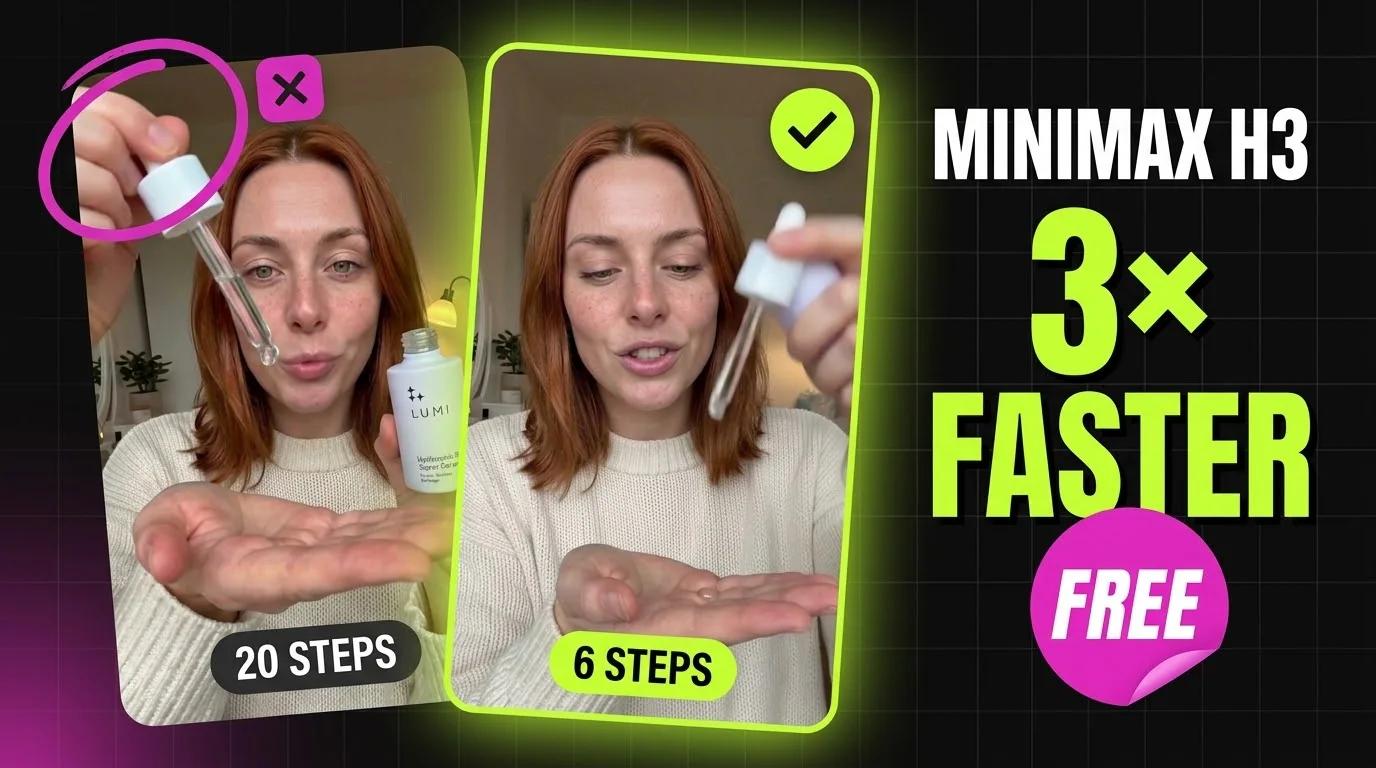
Pika Labs post-trained MiniMax H3 to make a video in 6 steps instead of 50, and the weights are open. In ComfyUI it's one LoRA file on top of H3. On an RTX 5090 it made an 8-second, 768 × 1344 clip with sound in 1:56, almost 3× faster than the full model at 20 steps, and it scored higher in my test.
Below you'll find every model you need with its download link, the exact settings, the results of the fair test, and all 4 Pika videos with the full prompt next to each one. The free workflow is in the download section.
What Pika H3 Flex is
Pika H3 Flex is Pika's fine-tune of MiniMax H3, the open video model that makes video and audio together in one pass. Pika says it's up to 1.8× faster than H3 Max. In ComfyUI it comes as a LoRA, so you keep your usual H3 model and add one file at strength 1.0.
There are two versions: ref2va (reference to video, used here: a face photo plus a first frame) and fl2va (first and last frame to video).
The fair test: 20 steps vs 8 steps vs 6 steps
I ran three setups with the same prompt, the same seed (1234), the same photos and the same resolution (768 × 1344, about one megapixel, 192 frames = 8 seconds at 24 fps). All three used comfy kitchen attention, and I only timed them after the models were loaded.
| Setup | Steps | Time per 8 s clip | My score |
|---|---|---|---|
| Full H3 hybrid model, euler | 20 | 5:27 | 7.6 / 10 |
| LightX2V speed LoRA, ER SDE | 8 | 2:28 | 5.5 / 10 |
| Pika H3 Flex LoRA, LCM | 6 | 1:56 | 8.3 / 10 |
- Full model: still the cleanest audio, and real skin.
- LightX2V: plastic skin, more over-acting, a logo on her tee that was never in the prompt, and a third hand in the serum test.
- Pika: real skin and realism on par with the full model, the only one that kept two hands on the serum test, and almost 3× faster. It's my new default for 1 MP, 8-second clips.
Want to speed up the full model instead? See my Spectrum guide for MiniMax H3.
What you need
- An up-to-date ComfyUI (the workflow was saved with ComfyUI 0.43). MiniMax H3, the Reference to Video node and comfy kitchen attention are built in.
- ComfyUI-KJNodes for the two memory-saving nodes, MiniMax Chunk FeedForward and MiniMax Low VRAM Attention. Install it from ComfyUI Manager, or open the workflow and click Install missing custom nodes.
- These model files, in the folders shown:
| File | Folder | Size | Download |
|---|---|---|---|
H3 hybrid model, ref2va + fl2va (minimax_h3_hybrid_fl2va_ref2va_b15-49-int8.safetensors) | models/diffusion_models/ | 21 GB | Hugging Face |
Pika H3 Flex LoRA, ref2va (pika_h3_flex_ref2va_v1_avg_rank_55_bf16.safetensors), strength 1.0 | models/loras/h3/ | 553 MB | Hugging Face |
Qwen3-VL 32B text encoder for H3 (qwen3vl_32b_minimax_h3_nvfp4_awq.safetensors), type minimax | models/text_encoders/ | 15.7 GB | Hugging Face |
H3 video VAE (minimax_h3_video_vae_fp16.safetensors) | models/vae/ | 5.2 GB | Hugging Face |
H3 audio VAE (minimax_h3_audio_vae_fp32.safetensors) | models/vae/ | 605 MB | Hugging Face |
Other versions that work too:
- Official model instead of the hybrid: minimax_h3_ref2va_pruned_int8_convrot (21 GB) from Comfy-Org. The hybrid is a community merge of the ref2va and fl2va models, which is why it handles a face photo and a first frame so well.
- Full-size Pika LoRA: pika_h3_flex_ref2va_v1_bf16 (2 GB) from Comfy-Org. For first/last frame videos use the fl2va Pika LoRA.
- Text encoder: NVFP4 is made for RTX 50-series cards. On other cards pick the int8 version (27 GB).
The workflow looks for the LoRA in a loras/h3/ subfolder. If you saved it somewhere else, just pick it again in the LoRA node.
Pika H3 settings in ComfyUI
The workflow is small. Only the model chain and the sampler differ from a normal H3 workflow, and all of this is already set:
- Model chain: Load Diffusion Model (H3 hybrid) → MiniMax Chunk FeedForward (chunks 4, threshold 2048) → MiniMax Low VRAM Attention (head chunks 4) → Model Attention Backend (comfy kitchen attention) → LoRA loader with the Pika LoRA at 1.0.
- Guider: Basic Guider, no CFG, the same as Pika's official workflow.
- Sampler: LCM.
- Sigmas: a Manual Sigmas node instead of a scheduler, with these 6 steps:
1.0, 0.972973, 0.923077, 0.8, 0.571429, 0.333333, 0.0- Inputs: Reference to Video takes your face photo as Picture 1 and the first frame as Picture 2. Add Guide pins that same first frame at frame 0, so the video starts exactly on your shot.
- Size: width 768, height 1344, length 192 frames (8 seconds at 24 fps), reference image size match.
- Output: decode the video and the audio, Create Video at 24 fps, save.
How to write MiniMax H3 prompts
I write every prompt by hand in MiniMax's own format, and it makes a big difference:
- subject_definitions: who is in Picture 1 (face, hair, voice) and what Picture 2, the first frame, shows.
- summary: one or two lines: what happens, how long, one take or several.
- retention_analysis: what has to stay exactly the same as the pictures.
- detailed_description: the look of the video, then the shot second by second, with the exact spoken line inside
<d>[English] ...</d>and a timestamp. - overall_soundscape and non_diegetic_music: the sounds you should hear, and None if you don't want music.
The 4 Pika H3 videos with their prompts
All four were made with the workflow below: 6 steps, seed 1234, 768 × 1344, 8 seconds with sound. Press play to hear the audio, and copy any prompt with the button on the right. Swap in your own face photo and first frame, and describe them in the first lines of the prompt.
1. Get ready with me at the bathroom mirror
Real skin, freckles and pores, the lipstick goes down on the sink, and the line lands on time. Next to the full 20-step model this one is very hard to tell apart. Made in 1:52 on an RTX 5090.
subject_definitions:
<Subject 1> is the young woman in <Picture 1>, late twenties, with shoulder-length copper-red hair parted in the middle, fair skin with natural freckles across the nose and cheeks, green-grey eyes, light natural makeup; in this video she wears the loose off-white tee from <Picture 2>. Her voice is warm, clear and relaxed, a young woman with a light American accent.
<Picture 2> is the first frame of this video: the bright bathroom with a white window frame, the sink edge with toothpaste and small skincare bottles, and her phone in a dark case held up in her left hand.

summary:
[reference generation] An eight-second single continuous take filmed on a phone: <Subject 1> stands at the bathroom mirror, finishes her lipstick, presses her lips together, and talks to the phone camera like a morning get-ready-with-me story. No cut.

retention_analysis:
<Subject 1> (appears in [Shot 1]): fully_preserved - face, freckles, copper-red hair, off-white tee and the phone from <Picture 2> are retained.
<Picture 2>: fully_preserved - the bathroom, the window light and the sink are retained as the opening frame.

detailed_description:
The target video is a live-action, realistic vertical 9:16 phone story, soft white morning daylight from the window, natural skin texture with visible pores and freckles, slight handheld sway from the phone, one unbroken take.

[Shot 1] Medium close-up, the phone stays in her left hand at chest height the whole time: <Subject 1> touches the nude-pink lipstick to her lower lip with her right hand in one short stroke, lowers the lipstick to the sink edge, presses her lips together once and relaxes them. At 00:02.500 she looks straight into the phone lens, smiles and says, <d>[English] Okay, five minute makeup, done. Honestly this lip colour goes with everything, I'm obsessed.</d> At 00:07.000 she tilts her head slightly and gives a small satisfied nod until the last frame.

overall_soundscape:
Quiet bathroom room tone with a soft echo off the tiles, the light click of the lipstick touching down on the ceramic sink edge, her voice close to the phone microphone.

non_diegetic_music:
None.
2. Takoyaki at a Tokyo night market
The night market was a near tie with the full model: the same bite, the same steam and the same line. The lantern light on her face stays natural. Made in 2:03 on an RTX 5090.
subject_definitions:
<Subject 1> is the young woman in <Picture 1>, late twenties, with shoulder-length copper-red hair parted in the middle, fair skin with natural freckles, green-grey eyes; in this video she wears the oversized beige hoodie from <Picture 2>. Her voice is warm, bright and playful, a young woman with a light American accent.
<Picture 2> is the first frame of this video: a narrow Tokyo food alley at night with red paper lanterns, neon signs and steam from the stalls, a wooden counter with a paper boat of takoyaki topped with sauce, mayonnaise and bonito flakes, and one takoyaki on a wooden skewer in her right hand.

summary:
[reference generation] An eight-second single continuous selfie take: in the night market of <Picture 2>, <Subject 1> bites the takoyaki, reacts to how hot it is, then tells the camera how good it is. No cut.

retention_analysis:
<Subject 1> (appears in [Shot 1]): fully_preserved - face, freckles, copper-red hair and beige hoodie are retained.
<Picture 2>: fully_preserved - the alley, lanterns, neon, the counter and the takoyaki boat are retained as the opening frame; the people behind her stay soft and out of focus.

detailed_description:
The target video is a live-action, realistic vertical 9:16 selfie vlog filmed at arm's length, warm red lantern light and pink neon on her face, light bokeh, natural skin texture, gentle handheld sway, one unbroken take.

[Shot 1] Selfie close-up, the camera arm stays out of frame: <Subject 1> bites half of the takoyaki ball off the skewer, a thin wisp of steam rises from the open half, she chews with her lips slightly open and fans her mouth once with her free fingers, eyes wide, laughing. At 00:03.200 she swallows, points the skewer at the camera and says, <d>[English] Oh my god, it's so hot. But that is the best takoyaki I've ever had.</d> She nods and grins at the lens until the last frame.

overall_soundscape:
Busy night market ambience: crowd chatter in Japanese in the background, sizzling from the grill plates, a vendor calling out in the distance, her short laugh and chewing close to the microphone.

non_diegetic_music:
None.
3. UGC serum review
The test that surprised me. She starts with the bottle in one hand and the other hand open. The full model and LightX2V both grew a third hand to open the bottle. Pika kept two hands and used the one already holding it. The cap isn't perfect, but the logic holds and the sweater stays the same. Made in 1:53 on an RTX 5090.
subject_definitions:
<Subject 1> is the young woman in <Picture 1>, late twenties, with shoulder-length copper-red hair parted in the middle, fair skin with natural freckles, green-grey eyes, no visible makeup; in this video she wears the cream knit sweater from <Picture 2>. Her voice is calm, warm and friendly, a young woman with a light American accent.
<Subject 2> is the serum bottle in <Picture 2>: a small white frosted glass bottle with a white dropper cap, the word LUMI and a small sparkle logo printed in lavender grey. Keep the bottle size real, about the height of her fingers.
<Picture 2> is the first frame of this video: a cozy bedroom corner with a lamp and a plant in soft daylight.

summary:
[reference generation] An eight-second single continuous UGC selfie take: <Subject 1> shows the LUMI serum to the camera, squeezes one drop onto her palm, and gives a short honest review. No cut.

retention_analysis:
<Subject 1> (appears in [Shot 1]): fully_preserved - face, freckles, hair and cream sweater are retained.
<Subject 2> (appears in [Shot 1]): fully_preserved - white frosted bottle, white dropper and the LUMI print are retained.
<Picture 2>: fully_preserved - the room, lamp and plant are retained as the opening frame.

detailed_description:
The target video is a live-action, realistic vertical 9:16 UGC phone review, soft window daylight with a warm lamp glow, dewy natural skin texture, slight handheld sway, one unbroken take.

[Shot 1] Close-up selfie framing: <Subject 1> holds <Subject 2> beside her cheek with her right hand and smiles at the lens, then says, <d>[English] This is the only serum my skin actually drinks.</d> At 00:03.500 she lifts the dropper out of the bottle and lets one small clear drop fall onto her open left palm, then lifts her eyes back to the camera and says, <d>[English] Super light, zero sticky. Trust me.</d> She smiles until the last frame.

overall_soundscape:
Quiet bedroom room tone, the soft glass tick of the dropper leaving the bottle, her voice close to the phone microphone.

non_diegetic_music:
None.
4. Morning run on the beach
Running is hard for any video model. Pika stays true to the first frame and keeps her face the same as she runs. LightX2V morphed her face and turned the skin waxy here. Made in 1:55 on an RTX 5090.
subject_definitions:
<Subject 1> is the young woman in <Picture 1>, late twenties, with shoulder-length copper-red hair parted in the middle, fair skin with natural freckles, green-grey eyes; in this video she wears the black sports top and small white earbuds from <Picture 2>. Her voice is bright and slightly breathless, a young woman with a light American accent.
<Picture 2> is the first frame of this video: a sandy beach at golden hour, waves breaking behind her on the left, a clear warm sky, nobody else on the beach.

summary:
[reference generation] An eight-second single continuous selfie take: <Subject 1> jogs along the shore holding the phone in front of her, talking to the camera between breaths while the wind blows her hair. No cut.

retention_analysis:
<Subject 1> (appears in [Shot 1]): fully_preserved - face, freckles, copper-red hair, black sports top and earbuds are retained.
<Picture 2>: fully_preserved - the shore, waves and golden-hour sky are retained as the opening frame.

detailed_description:
The target video is a live-action, realistic vertical 9:16 running selfie, warm low sunlight from behind giving a golden rim on her hair, flushed cheeks, natural skin texture with a light sheen of sweat, a steady rhythmic bounce from her running stride, one unbroken take.

[Shot 1] Selfie close-up at arm's length, the camera moves with her at a steady jogging pace: <Subject 1> runs along the wet sand, hair blowing across her face in the wind, waves rolling in behind her. At 00:01.500 she smiles, catches her breath and says, <d>[English] Morning run, day thirty. I used to hate running...</d> At 00:05.000 she laughs, breathing hard, and says, <d>[English] now I can't stop.</d> She keeps running and smiling into the lens until the last frame.

overall_soundscape:
Waves crashing and washing up the sand, steady wind over the phone microphone, her footsteps on wet sand, her breathing between words.

non_diegetic_music:
None.
Mistakes to avoid
- Swapping the guider or the scheduler. Keep the Basic Guider, the LCM sampler and the 6 manual sigmas from Pika's official workflow. They are what makes 6 steps work.
- Forgetting the LoRA strength. The Pika LoRA runs at 1.0. It is the whole fine-tune.
- Timing the first run. The first run also loads about 43 GB of models. Time the second run to see the real speed.
- A clip looks off? Change the seed before you rewrite the prompt.
Make your own AI influencer
Pika H3 Flex is already in my AI Influencer Pro course. You build your own AI influencer from scratch, train her LoRA so she looks the same everywhere, and make KREA 2 photos and MiniMax H3 videos ready for Instagram, plus UGC ads and motion transfer, on your own GPU or a cloud GPU.
Downloads
Download the workflow below and drag the JSON file onto the ComfyUI canvas. Install ComfyUI-KJNodes and the models from What you need first. It comes with the mirror prompt loaded, so pick your own face photo and first frame in the two Load Image nodes and press Run.